OpenMerchant Elements
Download the complete public OpenAPI schema
OpenMerchant Elements
OpenMerchant Elements are embeddable UI components for the sensitive parts of an agentic-checkout integration: collecting cards, picking a payment method, approving an agentic payment, and handing off merchant sign-in credentials. Each Element renders inside an OpenMerchant-hosted iframe, so card numbers and merchant passwords never touch your page or your servers — they flow directly from the user to the card vault, or into a short-lived encrypted credential ticket.
Elements authenticate with your publishable key (pr_pk_test_… / pr_pk_live_…) — browser-safe, origin-allowlisted, and capability-scoped. At mount, the iframe exchanges it for a short-lived, single-origin Element Session that authorizes the rest of the flow. Your secret key (pr_sk_…) never appears in the browser; it stays on your backend for the REST endpoints documented above.
Install the React components from npm:
npm i @procura/elements-react
The package is published at npmjs.com/package/@procura/elements-react.
The Elements
<AddPaymentMethod>
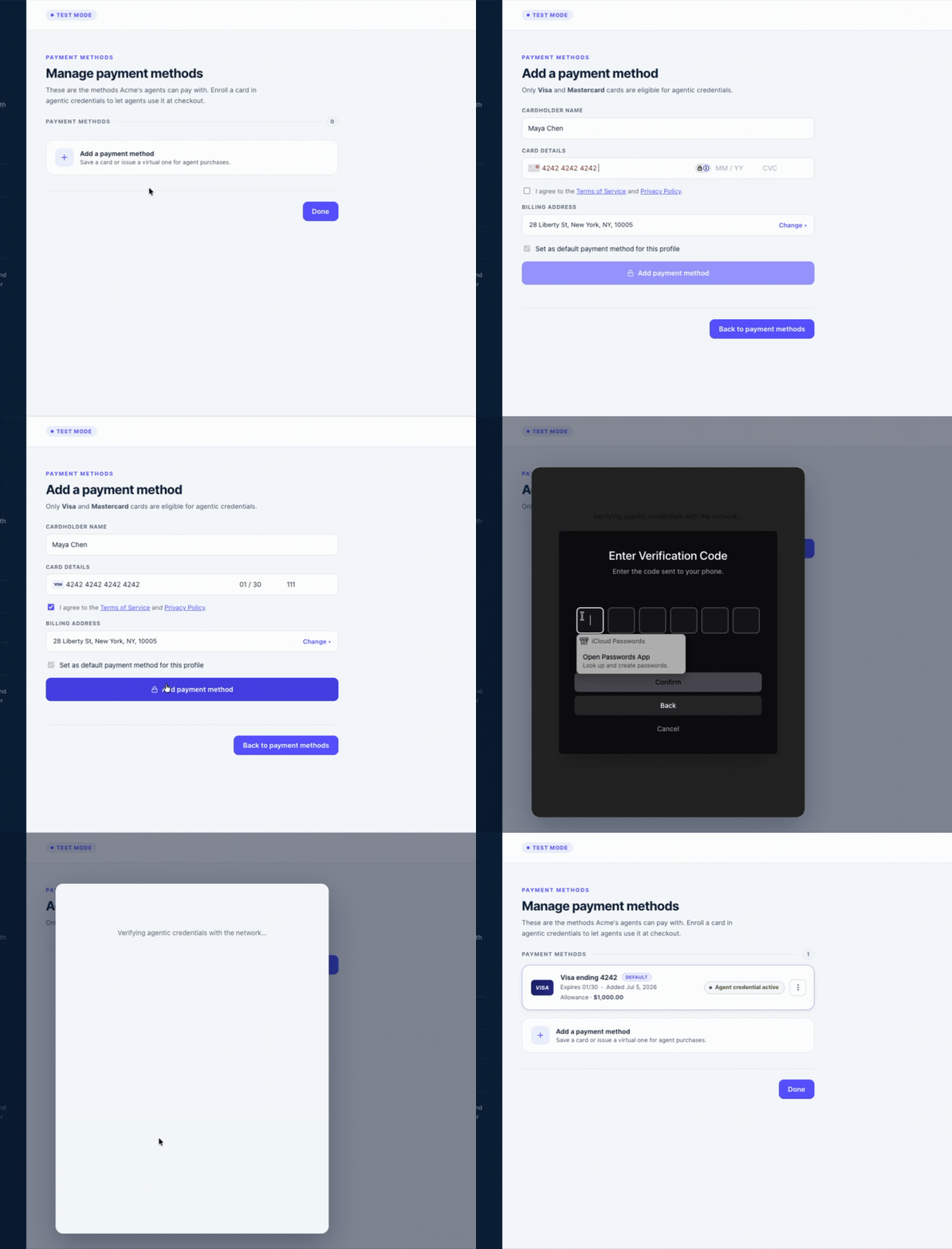
The card-onboarding Element. In a single flow it adds the card (details go straight into the card vault inside the iframe and are saved to the profile), optionally enrolls it in the Visa and Mastercard agentic-commerce protocols (running any verification ceremony inline), and captures the cardholder's approval of a standing budget the agent can spend against. Profile-scoped: pass profileId.
<OpenMerchantElementsProvider publishableKey="pr_pk_test_…">
  <AddPaymentMethod
    profileId="pr_pf_…"
    onComplete={(result) => console.log(result.profilePaymentMethodId)}
  />
</OpenMerchantElementsProvider>
<AddOrSelectPaymentMethod>
The checkout workhorse: lists the profile's saved cards, lets the user add one, and — when mounted with a purchaseIntentId — runs whatever follow-up the payment needs (CVC re-entry for a reused card, or the agentic instruction approval ceremony). Selection happens inside the iframe, but the commit is driven by your CTA: forward a ref and call ref.current.authorize() from your "Authorize purchase" button; onPaymentSelected tells you when to enable it. onComplete returns the fields you forward to your purchase execution call (profile_payment_method_id, temporary_cvc_token_id, agentic_credentials_preference, payment_verification).
<MerchantAuthHandoff>
One-time merchant sign-in for a checkout blocked on merchant authentication. Render it when a PurchaseIntent reports status: "awaiting_merchant_auth" (or "merchant_auth_failed" for a retry — the Element shows retry copy automatically). The iframe collects the user's merchant username/password once, shows the exact merchant domain being signed in to, and submits the pair to OpenMerchant, which encrypts it into a one-time credential ticket (consumed atomically, expires in minutes, never persisted or logged) and — by default — immediately resumes the blocked checkout in an isolated browser session.
{purchaseIntent.status === 'awaiting_merchant_auth' && (
  <MerchantAuthHandoff
    purchaseIntentId={purchaseIntent.id}
    onComplete={(result) => console.log(result.next)} // "checkout_resuming"
  />
)}
Unlike the payment Elements, this one is purchase-intent scoped — no profileId; the blocked cart, attempt, and merchant are derived server-side from the intent. cartId is only needed when several carts are blocked at once. Invalid merchant credentials are not a synchronous error: submit returns accepted, and a bad password surfaces later as merchant_auth_failed — re-render the Element to let the user try again.
Defer mode. Pass deferRetry when your backend should control when the retry happens: submit then only mints the ticket, onComplete carries credentialTicketId, and your backend redeems it with POST /v1/purchase_intents/{id}/retry:
POST /v1/purchase_intents/{id}/retry
Authorization: Bearer pr_sk_…

{ "credential_ticket_id": "mct_…" }
Tickets are single-use (replays return 410) and intent-bound (a ticket minted for another intent returns 409 and is destroyed). Raw merchant credentials are never accepted on the REST API — the Element is the only credential-collection surface.
How to integrate
- Keys and origins. From Developers → API keys, copy your publishable key and allowlist every origin that will embed an Element (e.g.
http://localhost:3000,https://checkout.example.com). Bootstrap calls from other origins are rejected. - Install.
npm install @procura/elements-react
- Mount the provider once, near the root of your checkout UI:
import { OpenMerchantElementsProvider } from '@procura/elements-react'

<OpenMerchantElementsProvider publishableKey={OPENMERCHANT_PUBLISHABLE_KEY}>
  {children}
</OpenMerchantElementsProvider>
- Render Elements off the PurchaseIntent state you poll (or stream) from your backend:
| PurchaseIntent state | Render |
|---|---|
| needs a payment method | <AddOrSelectPaymentMethod profileId purchaseIntentId> |
awaiting_merchant_auth |
<MerchantAuthHandoff purchaseIntentId> |
merchant_auth_failed |
<MerchantAuthHandoff purchaseIntentId> (retry copy automatic) |
terminal (succeeded / failed) |
your own confirmation / failure UI |
Elements report acceptance via onComplete; the checkout itself progresses asynchronously — keep following the intent via GET /v1/purchase_intents/{id} or its /events stream.
Appearance
Every Element accepts an appearance object — a theme, CSS variables, and a constrained set of selector rules — so the hosted UI matches your brand. Unknown keys are dropped server-side, so the iframe never executes arbitrary CSS.
<MerchantAuthHandoff
  purchaseIntentId="pr_pi_…"
  appearance={{ theme: 'light', variables: { colorPrimary: '#111827' } }}
/>
Testing Elements
In test mode, use the test cards above inside <AddPaymentMethod> / <AddOrSelectPaymentMethod> to simulate the full enrollment and verification lifecycle. For <MerchantAuthHandoff>, drive a test-mode PurchaseIntent to awaiting_merchant_auth and submit any credentials — the isolated browser session signs in against the sandboxed merchant.